Code in your own language
Familiar Turkmen words help you focus on what a program does, one instruction at a time.
Zehin is a programming language being built for children in Turkmen. Write code, learn, and bring your ideas to life.
Free & open source · Windows x64 · Offline# Ilkinji programmagoý ýaş = 9 eger ýaş >= 7 ýaz "Salam, okuwçy!"bolmasa ýaz "Salam, dost!"gutardyA first step into programming should begin with understanding.
Familiar Turkmen words help you focus on what a program does, one instruction at a time.
A small vocabulary, readable syntax, and helpful error messages make room for experimenting.
Explore algorithms and use movement, turns, and colors to create geometric drawings.
Practice variables, conditions, and loops: ideas you will meet in other programming languages.
Start with a greeting. Change a value. Discover what a loop can do.
ýaz "Salam, dünýä!"Salam, dünýä!
A real desktop editor, with everything your first program needs. Built with Tauri 2 and a native Rust compiler.
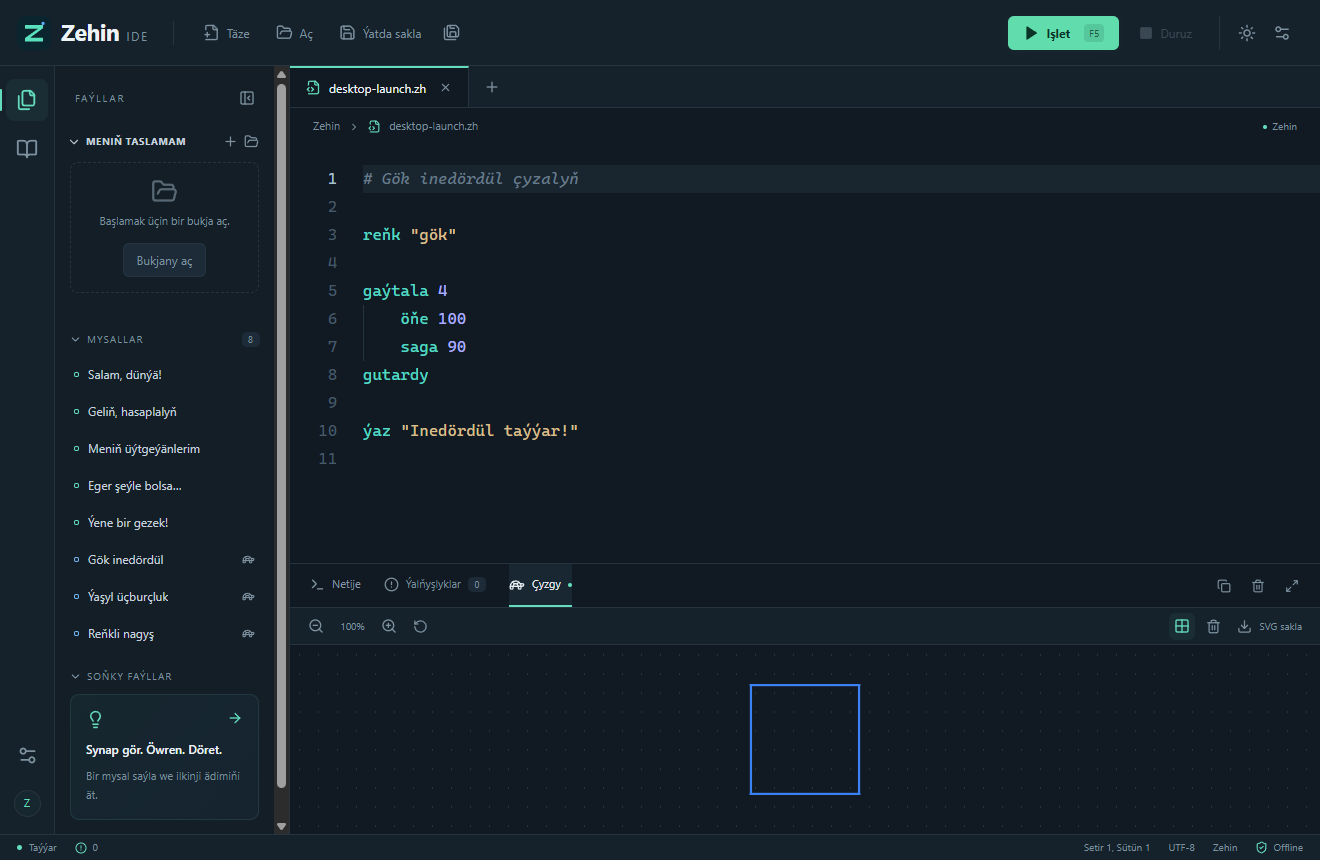
Syntax highlighting, completion, tabs, and local .zh files.
Press F5 to compile and run your current code. Stop a running program when you need to.
Turkmen explanations, suggestions, and clickable source locations.
Turtle graphics, zoom, a grid, and SVG export.
Open a folder and create, open, and save your programs.
The editor, examples, and compiler are bundled locally.
Install the Windows application. No Rust, Node.js, or account required.
Open “Salam, dünýä!” from the examples and make it your own.
Press F5, read the output, and try changing something.
Six short guides on this website. Practice in the desktop app with its eight editable examples.
Print your first message with ýaz.
Read the guideGive a value a name with goý.
Read the guideCalculate with +, −, *, and /.
Read the guideMake a choice with eger and bolmasa.
Read the guideRepeat instructions with gaýtala.
Read the guideExplore movement, turns, and colors.
Read the guideSit down together, choose a small task, and let a child explain what they think the code will do. Zehin gives you a starting point for exploring logic, problem solving, and creativity.
Download the early Windows release. The editor, native compiler, examples, and WebView2 installer are included.
Early release · unsigned installer
Windows may display a warning because this installer does not have a digital publisher signature yet. Verify the SHA-256 checksum before installing.
SHA-256 checksumsPackaged builds for Linux and macOS have not been released. Source build notes are included in the README; those platforms have not been verified.
IDE, compiler, virtual machine, CLI, and examples. Distributed under the MIT license.
Source codeMIT · In active development
Zehin is an educational programming language with Turkmen commands. Zehin IDE is its desktop editor; a shared Rust compiler and virtual machine execute the programs.
Children, beginning programmers, parents, teachers, and schools looking for a Turkmen-language introduction to programming.
The current project is distributed under the MIT license. You can download the application and source code for free.
Yes. Once downloaded, the packaged application runs locally without an internet connection, account, or remote compiler.
A Windows x64 installer is available. It includes WebView2. Ready-made Linux and macOS builds are not published.
Text programs, arithmetic, variables, conditions, counted loops, and turtle drawings. Functions, arrays, input prompts, and while loops are not implemented in version 0.1.